
How to Buy Turkey eSIM? | eSIMfo Guide
Seamless internet guide for your Turkey trip! Easy setup, advantageous packages, and 24/7 support.

In this article
For our expatriates, business professionals, and travelers visiting Turkey, the moment of arrival in the homeland carries great excitement. However, immediately after stepping off the plane, you need internet to inform your loved ones, open navigation, or coordinate transportation. Waiting in long lines at airport kiosks to buy a local physical SIM card or facing high international roaming bills can lower your travel quality. Thanks to our digital solution, which ends the hassle of searching for physical cards at border gates and airports, your Turkey journey is now completely seamless and stress-free.
Why Should You Use eSIM in Turkey? What Are the Advantages?
Unlike traditional physical SIM cards, digital network profiles completely liberate your travel. There are many important reasons to choose this next-generation technology for your Turkey trip:
- No More Airport Queues: When you land in Turkey, you don't have to look for operator kiosks, present your passport, and wait for hours for line activation.
- Avoid High Bills: Instead of paying the high international roaming fees of the operator in your own country, you benefit from local price advantages.
- No Physical Card Replacement: You do not need to remove your original SIM card from your phone. Thus, the risk of losing small cards is completely eliminated, and you can continue to receive SMS from your own line (for example, bank confirmation codes).
Important Information: eSIMfo services and the data packages it provides are absolutely not banned in Turkey. Thanks to our infrastructure, which is fully compatible with Turkish laws and infrastructure, you can use your internet safely in Turkey and abroad without encountering any legal obstacles.
Set Up Abroad, Connect Instantly in Turkey!
The biggest comfort of this system is that you determine the timeline. You can install your Turkey package on your phone in minutes while you are still at your home abroad or before boarding the plane. If you complete the setup while abroad, your phone connects to the local network within seconds the moment you arrive in Turkey and turn on your phone, making your internet ready instantly. This method, which ends the search for internet as soon as you step off the plane, completely removes the decision fatigue of the arrival day.
Step-by-Step Buying Process via the App
Reaching the data plan you need for your Turkey trip and completing the purchase process is extremely easy with our mobile application. You can have your travel package in 3 steps by following the steps below:
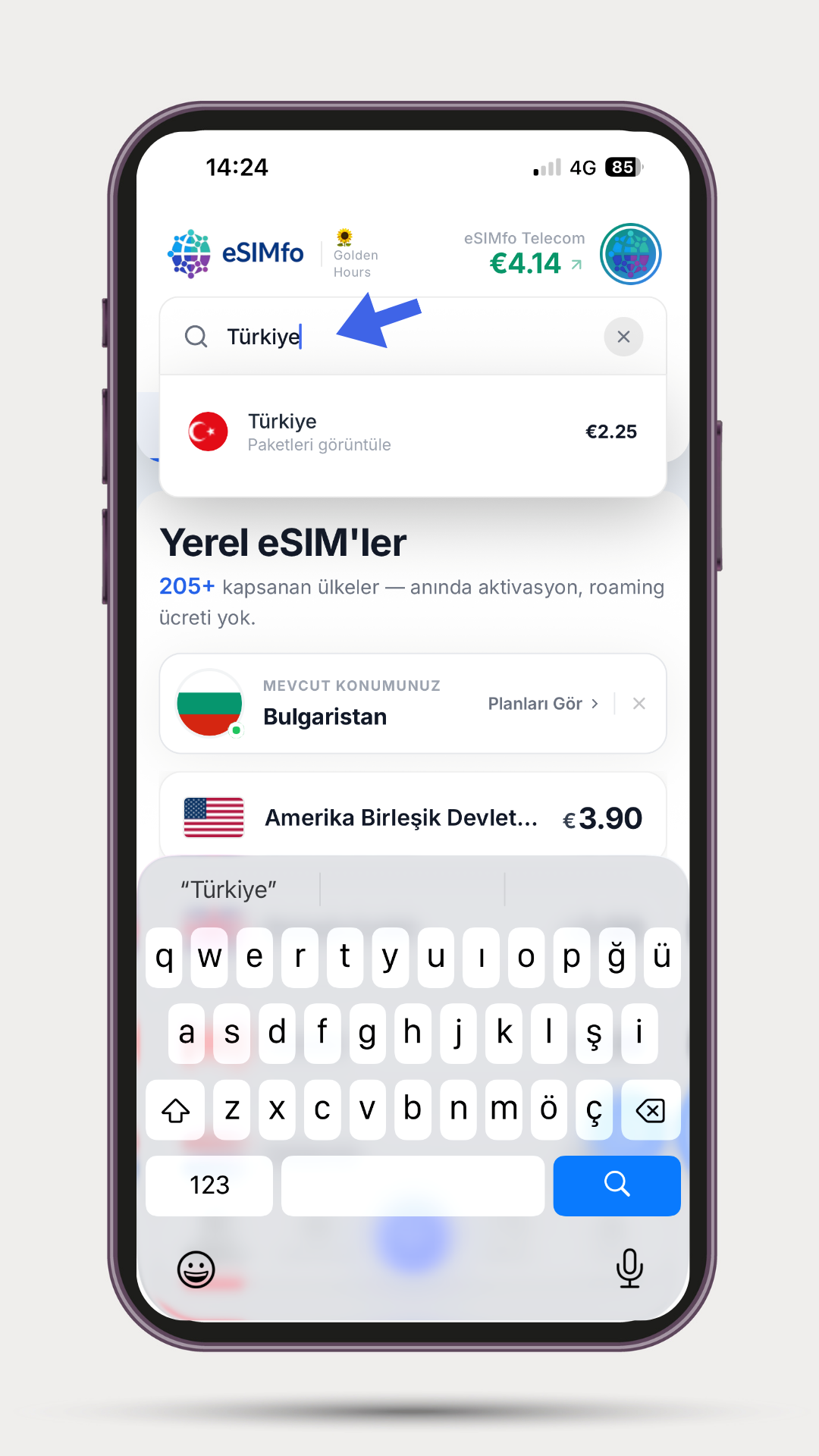
Step 1: Find the Turkey Package: Open the eSIMfo mobile application. Type "Turkey" in the search bar on the main screen. Click on the Turkey option from the listed results to switch to the country-specific page.
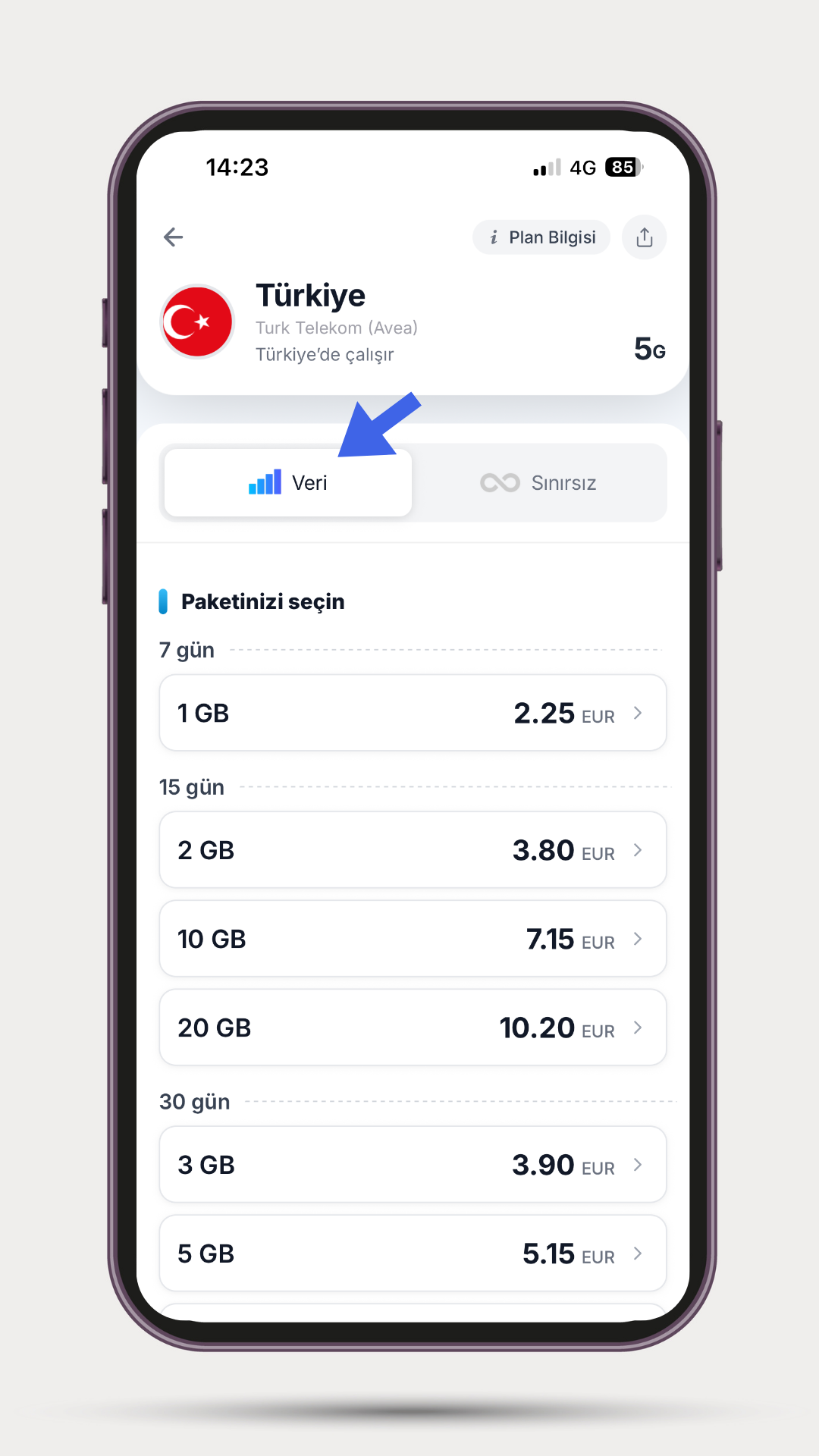
Step 2: Review Limited Packages: When the Turkey packages are listed, click on the Data option in the top menu to see our limited (GB limited) products suitable for your travel duration and make a choice based on your usage amount.
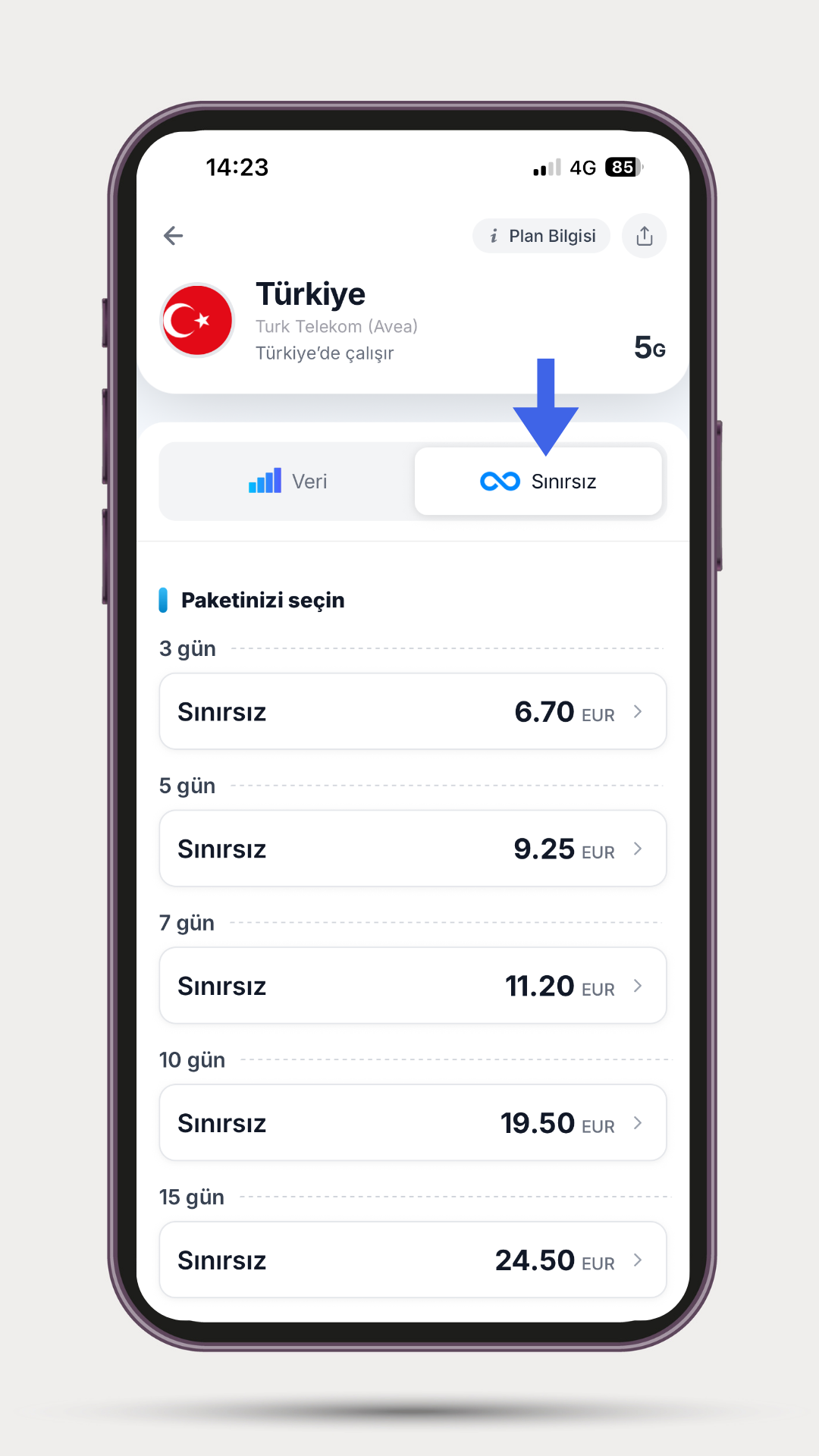
Step 3: Review Unlimited Packages: If you do not want to track data and use the internet intensively, you can view our Turkey packages offering unlimited internet by clicking on the Unlimited option.
After choosing the product that best suits your needs, you can complete the transaction using secure payment methods. After payment, your QR code and digital profile are instantly delivered to your in-app screen and email address.
Usage Rule Reminder: The usage period of the product you purchased does not start the moment you make the payment. The period becomes active when you install the product on your phone and connect to the relevant local network in Turkey for the first time. In this way, you can purchase your package days in advance safely.
Easy Activation Steps
After the purchase process, you only need to follow the steps below to integrate your digital profile into your device and start using it:
📱 iOS (iPhone) Setup
Enter the “My eSIMs” tab via the eSIMfo application and click on the “Install eSIM” option. The system will automatically direct you to the installation screen. You can easily complete the installation by following the steps on the screen.
📱 Android Setup
Manual installation is done with a QR code on Android devices. Save it to your phone with the "Download QR code” option via eSIMfo.
- 1️⃣ Step 1: Open the downloaded QR code from the Gallery. On some devices, when you press and hold the QR code, the “Add eSIM” option appears and the installation starts directly.
- 2️⃣ Step 2: If this option does not appear; go to Settings > Connections > SIM Manager > Add eSIM (or Add SIM) section.
- 3️⃣ Step 3: Upload the QR code you downloaded with the “Scan QR code” or “Select from gallery” option.
- 4️⃣ Step 4: After the installation is complete, you can start using the internet by activating your eSIM line.
Our 24/7 Uninterrupted Support Team is With You
You are not alone in any questions you may have during your Turkey trip or during the installation phases. No matter what stage of the journey you are in, you can contact our professional technical support team serving 24/7 whenever you need help. Our team is just a click away for an uninterrupted data flow and a comfortable homeland visit.
Download the eSIMfo App Now
To reach the most suitable data packages, track quotas, and manage your digital profiles from a single place throughout your trip, you can download our official mobile applications from the links below:
- 🤖 For Android: Download the eSIMfo Android Application via Google Play Store
- 🍎 For iOS (iPhone): Download the eSIMfo iOS Application via App Store