
Samsung eSIM Not Working? A Travel Troubleshooting Guide
Missing Add eSIM, a rejected QR code or no data abroad? Check your Samsung Galaxy model, SIM manager and travel settings before deleting the eSIM.

In this article
You installed a travel eSIM before flying, but your Samsung Galaxy will not connect after landing. Or the problem starts earlier: there is no Add eSIM option, or the QR code is rejected. These are different problems. Work out which stage failed before changing settings or buying a second plan.
Start with three checks: the exact phone variant supports eSIM, the travel line appears in SIM manager, and that line is selected for mobile data. Do not delete an installed eSIM as your first troubleshooting step: reinstalling may require your provider's help or a replacement profile.
Checked 9 October 2026 against Samsung's support documentation. eSIMfo sells travel eSIMs; this guide does not represent a Samsung hardware test. The cover is an editorial illustration. Menu screenshots are Samsung examples in English; wording varies with model, market and One UI version.
Which Samsung eSIM problem are you seeing?
| What you see | Check first | Next useful action |
|---|---|---|
| No Add eSIM menu | Exact model, purchase region and software | Check Samsung's official support list and ask the original carrier about restrictions |
| QR code rejected | Whether the profile already appears in SIM manager | Check the provider's installation details before scanning again |
| eSIM installed, no internet | Selected data line, destination and plan validity | Follow the plan's roaming and APN instructions |
| Data works, bank SMS missing | The number registered with the bank | Check that original line; data service alone does not receive its SMS |
Why is Add eSIM missing on my Samsung?
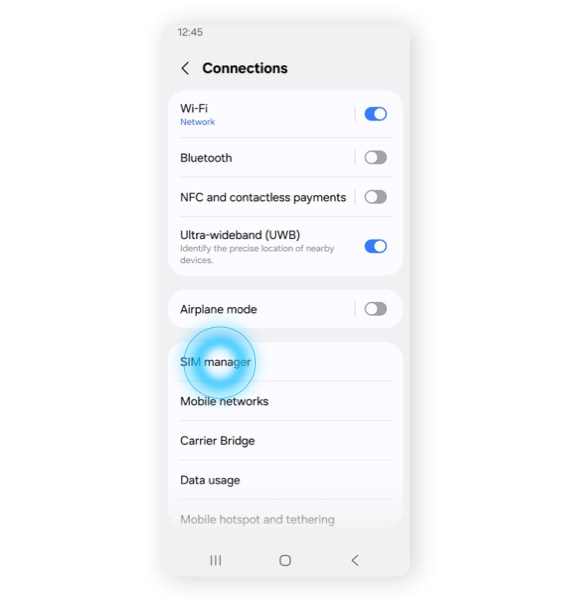
Open Settings → Connections → SIM manager → Add eSIM. If the option is absent, check the model number under About phone and compare it with Samsung's supported devices and carriers. A Galaxy family name is not enough: support can differ by variant and country of purchase.
Install available official updates through Settings → Software update → Download and install. Confirm any carrier lock with the original operator. An update cannot add hardware capability that the specific device lacks; do not buy another eSIM simply because a similarly named Galaxy supports it.
What should you do when the QR code fails?
Use a stable internet connection and open SIM manager first. If a new travel line is already listed, the initial installation may have succeeded; repeated scanning is not necessarily the solution. Compare the line with your order information and provider instructions without publishing its identifiers.
For a new installation, choose Add eSIM → Scan QR code. If the provider supplied a manual activation code and the phone offers manual entry, use those exact details. A QR image displayed on another device is often easier to scan. Do not alter the activation string, share the QR code publicly or assume it can be reused on a second phone.
If it still fails, send support the error text, model number, software version and order reference through the official support channel. Hide QR codes, activation codes and private numbers in screenshots.
The eSIM is installed: why is there no internet abroad?
Check these in order while you still have hotel or airport Wi-Fi:
- Confirm the destination is included and the plan is valid with data remaining. Installation and validity start are not always the same event.
- Enable the travel line and select it for mobile data in SIM manager. Keep your home line's data roaming off unless you intentionally want to use its roaming plan.
- Enable data roaming on the travel eSIM only if its instructions require it. Enter an APN only when the provider supplies one; random APN changes can make diagnosis harder.
- Review automatic data switching so the phone cannot unexpectedly use your other line for paid data. Available controls vary.
- Turn Wi-Fi off for the test. If the network does not register, briefly toggle flight mode or restart. Use manual network selection only with the provider's supported-network guidance.
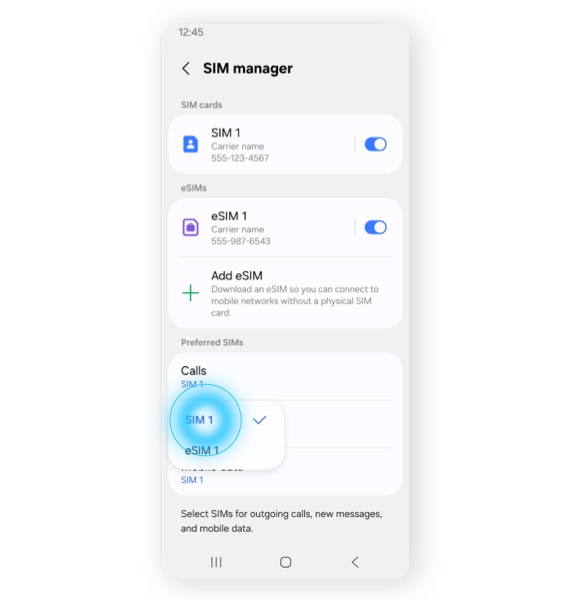
Bars without internet and no service at all are useful clues, not proof of the same fault. A data allowance, APN or selected-line issue differs from a coverage or registration issue. Save offline maps and your accommodation address before travelling through areas where signal may be weak.
Can your home number stay on for calls and SMS?
On a compatible dual-SIM configuration, keep the home line enabled and use the travel eSIM for data. Calls and ordinary SMS still follow the relevant phone number and carrier service. Receiving a code for your home number requires that original line to work abroad; a data-only eSIM does not replace it. Call charges, Wi-Fi calling and SMS availability depend on the operator and plan.
For the installation sequence, see our eSIM activation guide. If you genuinely need an additional number, compare the separate global eSIM with calls and SMS guide. Neither a new number nor a data-line change automatically redirects bank codes.
Samsung eSIM: practical questions before and during travel
Do all Samsung Galaxy phones support eSIM?
No. Check the exact model, regional variant and carrier restrictions. A supported series name does not establish compatibility for every device sold under that name.
Can I install the eSIM before leaving home?
Often yes, using Wi-Fi, but check when that particular plan starts counting validity. Some plans begin on installation; others begin after a supported network connection.
Why does scanning the QR code again fail?
The profile may already be installed, or the code may be used or otherwise invalid. Check SIM manager and ask the provider before deleting a line or purchasing again.
Should data roaming be on or off?
Follow the travel eSIM's instructions for that line. Keep the home line's data roaming off when you do not intend to pay for its roaming data; the two settings have different purposes.
Can I keep WhatsApp on my usual number?
Changing the mobile-data line normally leaves your WhatsApp registration unchanged. Re-registering the app can require a verification code sent to the original number.
Will a factory reset fix a travel eSIM?
Do not start with a factory reset. Check the selected line, plan validity, roaming and APN first, and contact support. Resetting or deleting profiles can remove settings or make reinstallation necessary.
Does a data-only Samsung eSIM receive SMS?
The phone may support SMS, but a data-only plan does not provide an SMS-capable number. Messages addressed to your existing number still need its original service.
Sources and further help
Samsung: eSIM devices and supported carriers · Samsung: installing SIM and eSIM · Samsung: dual-SIM settings and menu images