
eSIM Purchase & Setup on Apple Devices | eSIMfo
Step-by-step eSIM purchase, easy installation, and activation guide for Apple devices.
In this article
Apple Devices eSIM Purchase, Installation, and Activation Guide
For business professionals, globetrotters, and vacationers traveling worldwide, the moment of arrival at the destination carries great excitement. However, right after stepping off the plane, you need the internet to notify your loved ones, open navigation, or coordinate transportation vehicles. Waiting in long lines at airports to buy a local physical SIM card or facing high international roaming bills can lower your travel quality. Thanks to our digital solution that puts an end to the hassle of searching for physical cards at border gates and airports, your travels are now completely uninterrupted and stress-free.
Why Should eSIM Be Used? What Are the Advantages?
Unlike traditional physical SIM cards, digital network profiles completely liberate your travel. There are many important reasons to choose this next-generation technology for your travels:
- End of Airport Lines: When you land in your destination country, you do not have to look for operator kiosks, present a passport, and wait for hours for line activation.
- Avoid High Bills: Instead of paying the high international roaming fees of the operator in your own country, you benefit from local price advantages.
- No Physical Card Replacement: You do not need to remove your original SIM card from your phone. Thus, the risk of losing small cards is completely eliminated, and you can continue to receive SMS (for example, bank confirmation codes) from your own line.
Important Information: eSIMfo services and the data packages it provides are fully compatible with legal regulations and global telecommunications infrastructures. Thanks to our secure infrastructure, you can legally use your internet both domestically and internationally safely, without getting stuck on any obstacles.
Set It Up Abroad, Connect Instantly at Your Destination!
The greatest comfort of this system is that you determine the timeline. You can install your travel package on your phone within minutes while you are still in a comfortable environment at home or before boarding the plane. If you complete the installation while abroad, the moment you reach your destination and turn on your phone, it connects to the local network within seconds and you find your internet ready instantly. This method, which puts an end to searching for internet as soon as you step off the plane, completely removes the decision fatigue of the arrival day from you.
Step-by-Step Purchase, Installation, and Activation Process on Apple Devices
Reaching the data plan you need for your travel, completing the purchase transaction, and installing it on your Apple device is extremely easy with our mobile application. You can instantly activate your travel package by following the steps below:
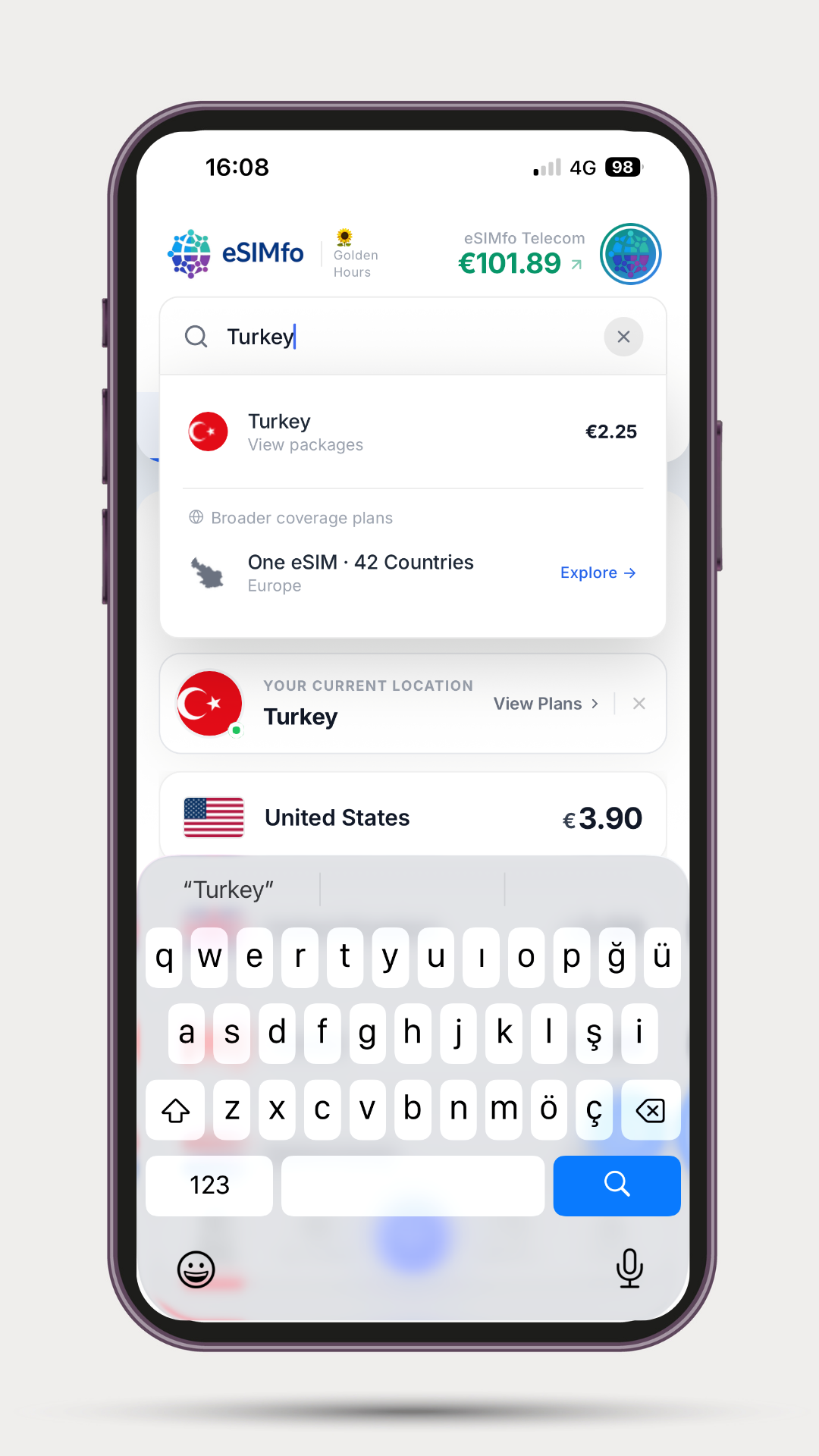
Step 1: Select Your Destination Country: Open the eSIMfo mobile application. Type the name of the country you will travel to in the search bar located on the main screen. Proceed to the package page special to that region by clicking on the relevant country from the listed results.
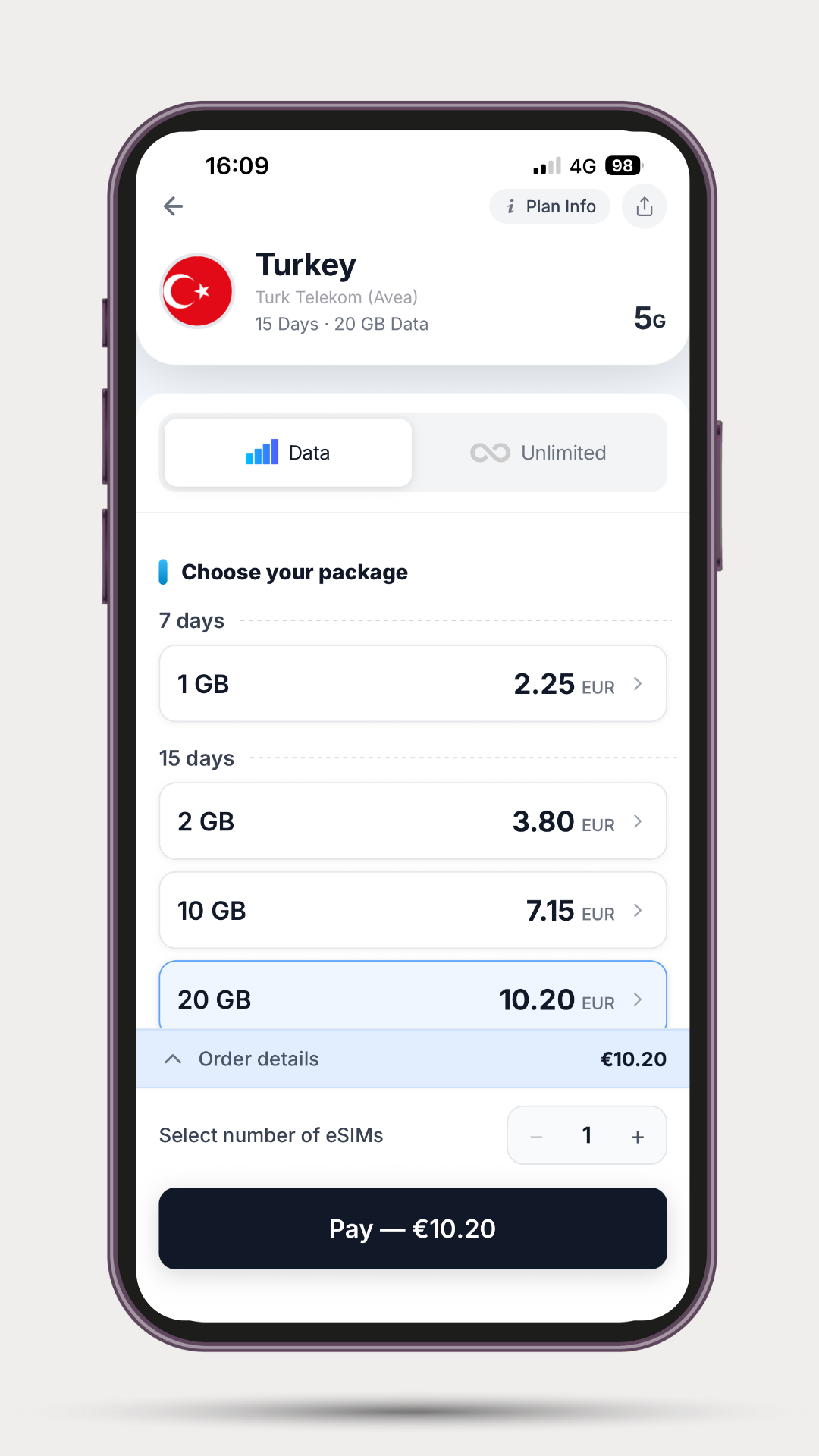
Step 2: Package Selection and Summary Details: Select the product that best suits your travel among the listed data plans. When you select the product, the "Order Details" button will appear at the bottom along with the payment option where you can purchase directly. You do not need to enter any date in this field; your package duration will start not when you purchase it, but when you install the eSIM on your device.
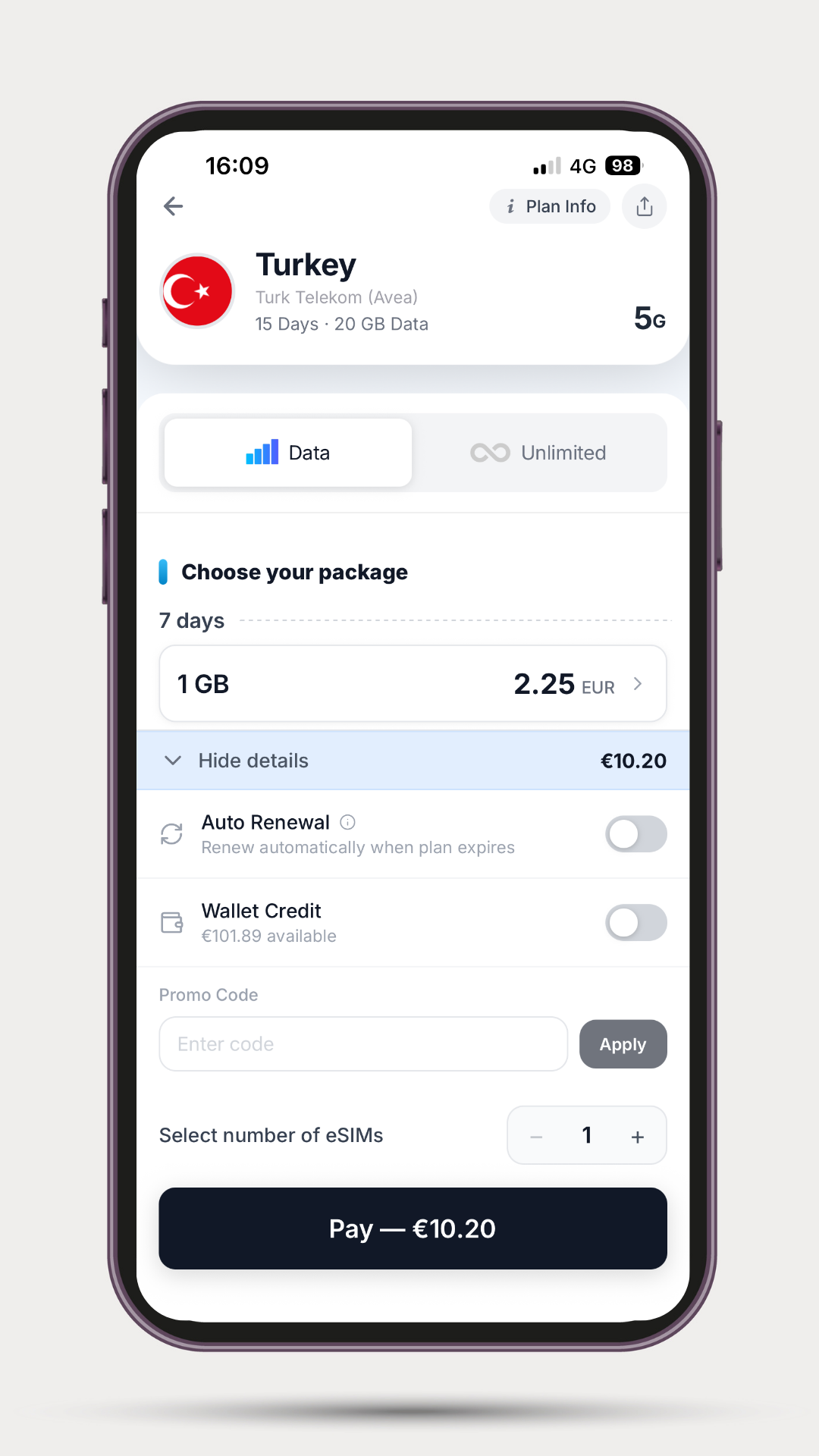
Step 3: Order Details and Payment: You can open this screen by clicking on the "Order Details" option. To prevent your internet from being cut off, you can turn on automatic renewal from the "Auto Renewal" option, activate the "Wallet Credit" option to use your accumulated credit, or write it in the "Promo Code" section if you have a discount. Then, you can proceed to the secure payment screen by pressing the "Pay" button and complete the payment with the method you desire. After the purchase, it is enough to click on the "My eSIMs" tab in the bottom menu to view your eSIM instantly.
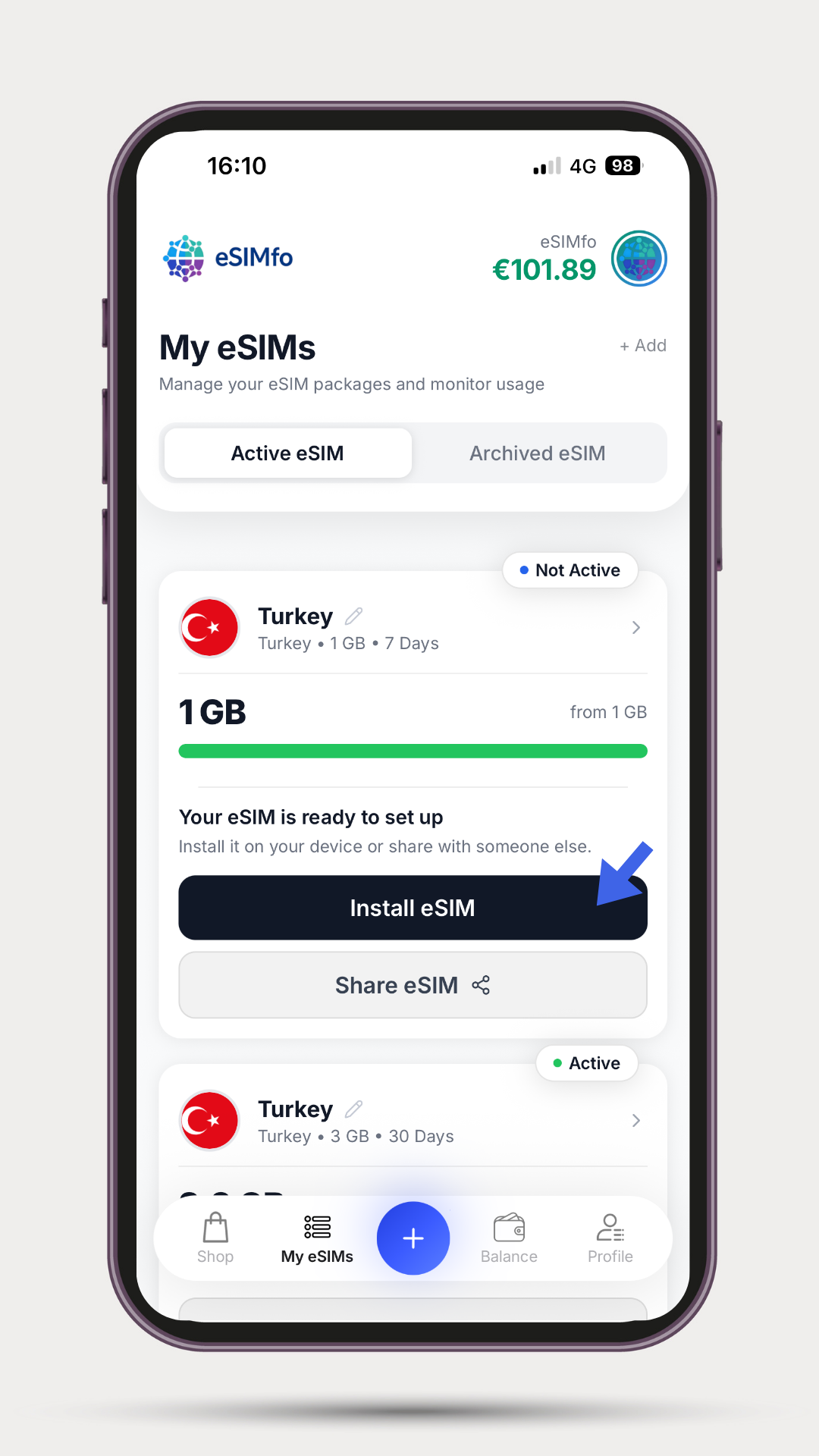
Step 4: Viewing the Purchased eSIM: Following a successful payment transaction, you will see the relevant product in the "My eSIMs" tab you entered to see your plan. You need to press the "Install eSIM" button on the screen to proceed to the stage of loading this plan onto your device.
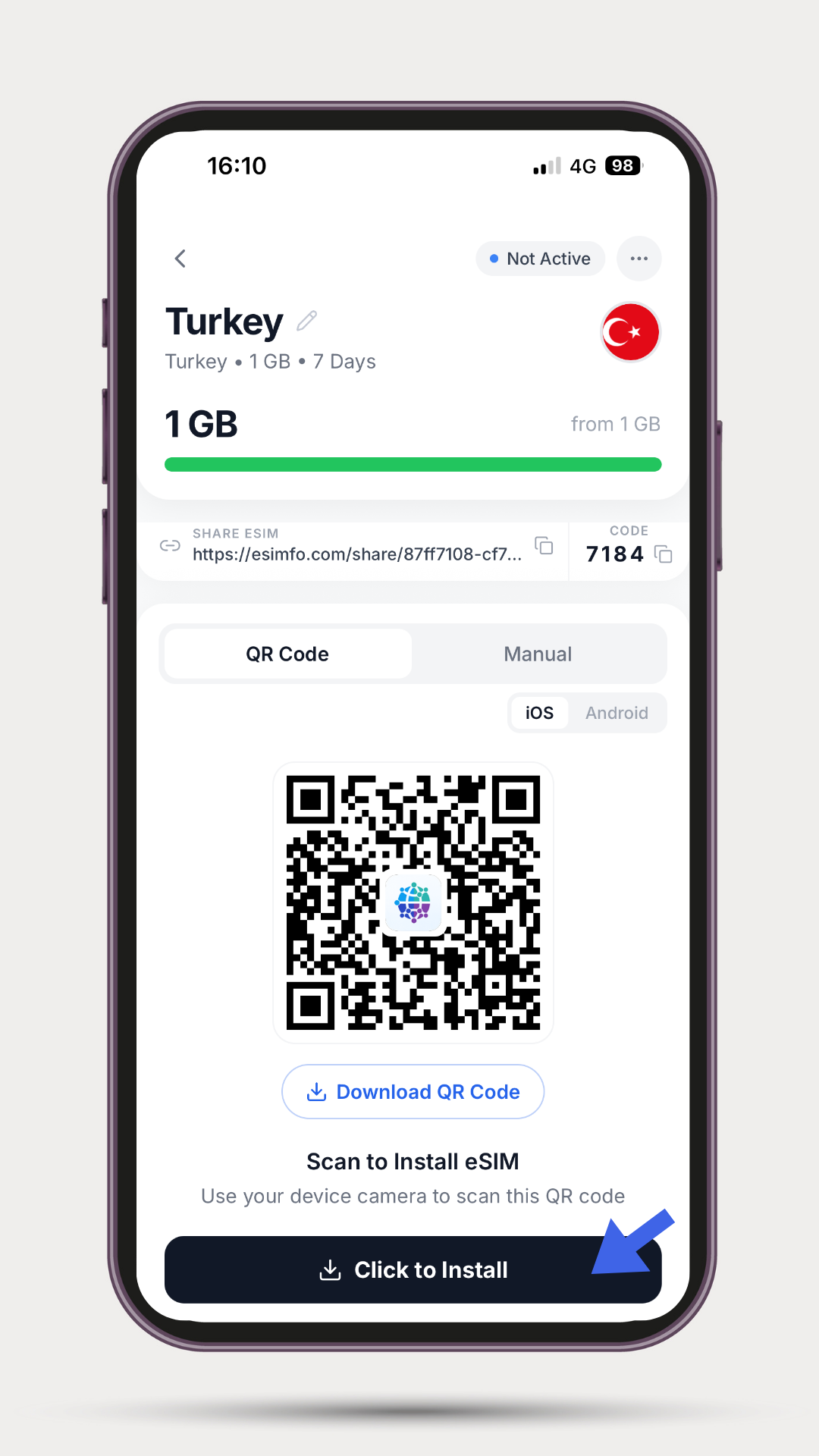
Step 5: Starting the Automatic Installation: When you click on the "Click to Install" button on the screen that comes before you, the automatic installation process will start on your device. Important Warning: At this stage, you must wait for the installation to finish completely and never interrupt the process. If the installation screen is closed halfway or interrupted, your eSIM will become completely invalid due to security protocols.
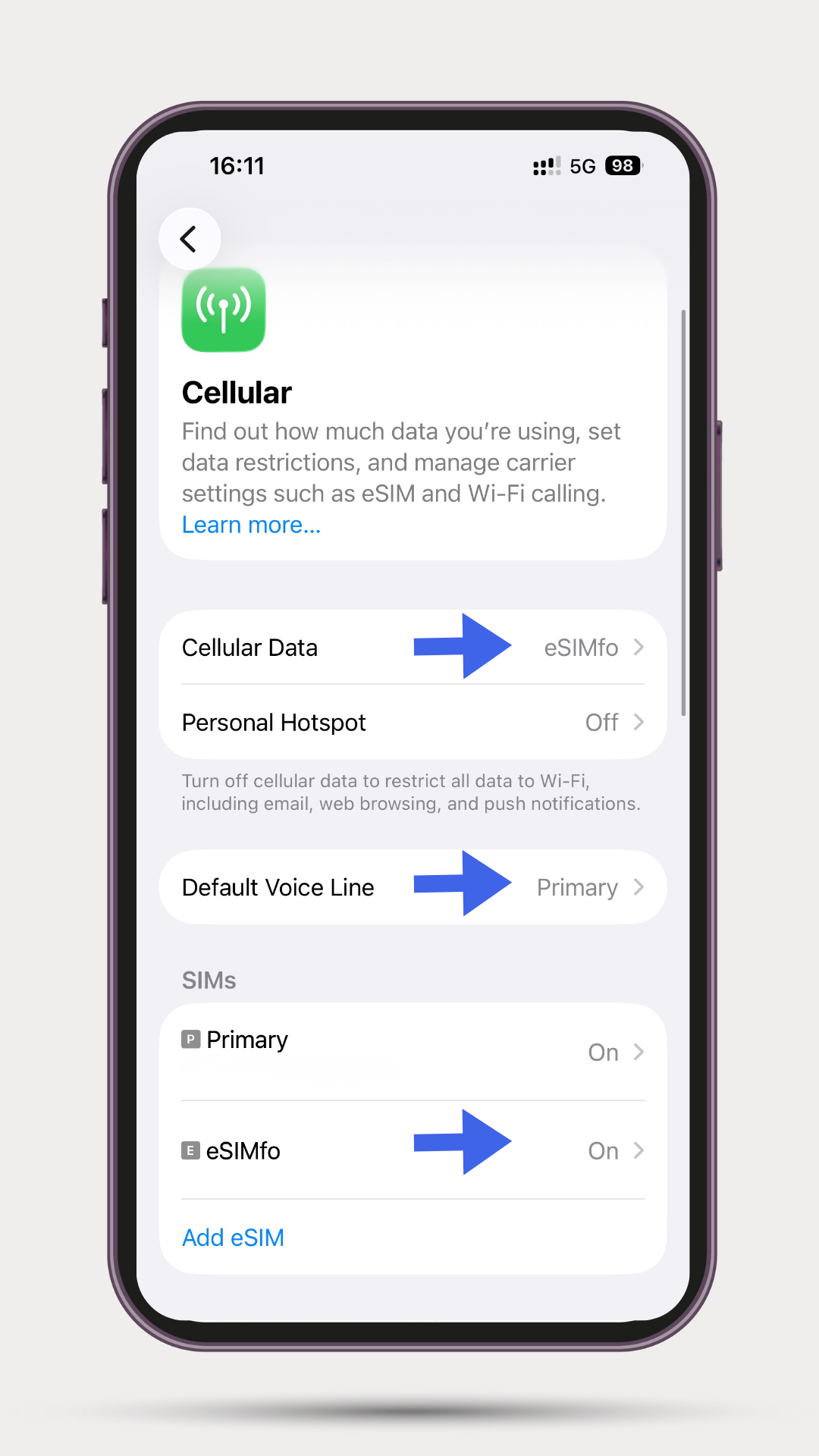
Step 6: In-Device Cellular Settings: After the installation is finished, come to the Settings > Cellular screen of your iPhone phone. Find the newly installed eSIM line in the "SIMs" tab and turn its position to "On". Then, select your eSIMfo line for the Cellular Data option. If you want to continue using your own number for your calls and SMS while traveling, leave your own main line selected in the Default Voice Line section.
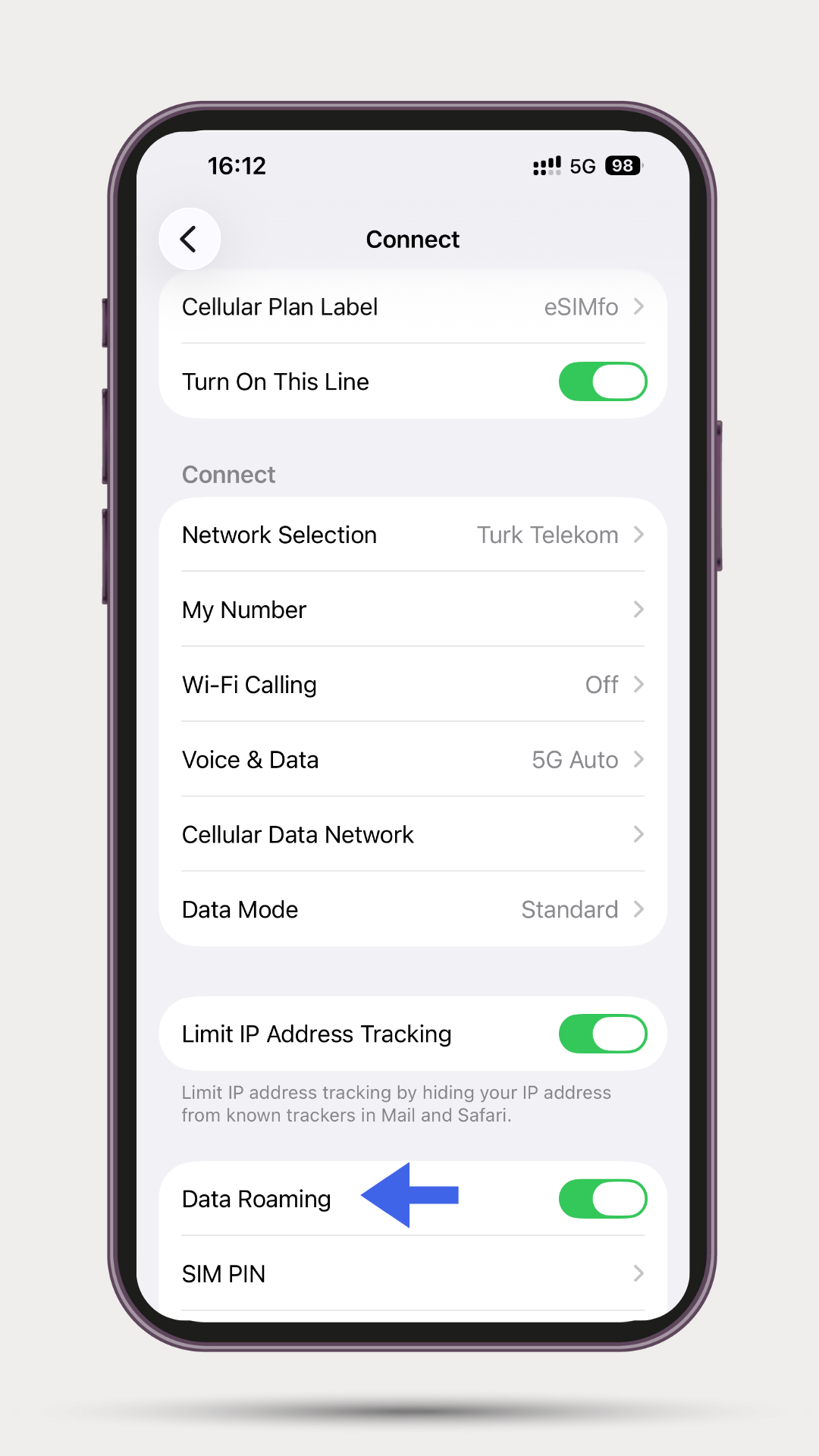
Step 7: Turning on Data Roaming and Activation: Click on the eSIM profile you added from the SIMs list in the cellular tab and activate the Data Roaming option inside it. Finally, to ensure the network settles successfully, take your phone into airplane mode for about 10 seconds and then turn off airplane mode. After these transactions are completed, your eSIM will be successfully active and you will be able to start using the internet.
Our 24/7 Uninterrupted Support Team is by Your Side
Throughout your travel; you are not alone in any stage of the purchase, installation, or activation processes whenever a question comes to your mind. At any moment you need help, you can reach our professional technical support team serving 24/7, and get help whenever you wish.
- 💬 Our WhatsApp Live Support Line: https://wa.me/436605906464
Download the eSIMfo Application Now
To reach the most suitable data packages throughout your travel, track quotas, and manage your digital profiles from a single place, you can download our official mobile applications from the links below:
- 🤖 For Android: Download eSIMfo Android Application via Google Play Store
- 🍎 For iOS (iPhone): Download eSIMfo iOS Application via App Store